17 Apr 2012

merfolk WIP


 Not long until deadline now. I have been working flat out on the animation for 'merfolk' recently and should have it all completed by the end of the week, leaving time for compositing and matte painting.

Here's a small example of what to expect:
Our heroes with Colin the sponge


Cheeky bit of police brutality


Satire ohohohoho


7 Apr 2012

Flock The System

Programming assignment complete.

I haven't blogged for a while.  Along with the ongoing major project progress, I have been working on this:


Flocking system for maya, created as a group programming project with Jeremy Booth and Nathan Hayles. The system itself is an openGL application written in C++, using Jon Macey's NGL (NCCA Graphics Library). The maya GUI uses Maya Python API, and launches the executable from within maya to provide an efficient workflow.

My individual responsibilities were the python GUI, the curve/obstacle importers/exporters (file write in/out) allowing for real time updating, goal following (allowing sub-flocks with multiple curves), and some work on the final interface and xml exporter.

The aim was to create a flocking system to be used with maya to provide a fast efficient workflow, allowing lots of user control over the behaviour of the flock, and look of the final piece.  When the python script is run, the user will be asked to create/select a project directory where exported files will be written to and read from, allowing the exporting to work seamlessly in the background as changes are made.  Initial values for number of boids, time taken for flock to follow curves and frame-rate can be set in maya using the GUI.

The user can create curves in maya to be used as paths for the flock to follow.  The flock is split into sub-flocks depending on the number of paths to follow.  These can be edited/created/deleted and updated as the program is still running.  Spheres and cylinders can be created as proxy geometry to act as obstacles that the boids avoid.  There is also a predator mode, that can be toggled on and off, where the flock disperses to avoid a predator that is chasing them.

There are many attributes that can be modified using the GUI such as seperation, cohesion and alignment; max speed, max force, mass and scale of boids/predator; and influences of obstacle avoidance, predator avoidance and goal following.  Boids can be added and deleted on the fly, and there are animation controls to pause and reset positions of flock and goals.  When the flock is behaving as the user wishes, it can be recorded.  This writes out the position and rotation data for each boid each frame as an xml file.

The xml file is then read into maya and the flock is created as locators.  A user defined mesh can be duplicated across the locators using the 'post-flock' section of the GUI.

The video demonstrates a quick example of what it can do.  I will create a more polished example, including renders to show the full potential, but over all I am pretty happy with the outcome.

12 Mar 2012

Innovations - Done

Watch HD fullscreen and tilt your head yo


If you don't wanna fuss about with funky aspect ratios/want to see comp layers. Also you can laugh at how I sound like a drunk toad.

24 Feb 2012

glitchy glitchy yah yah

innovations progress...

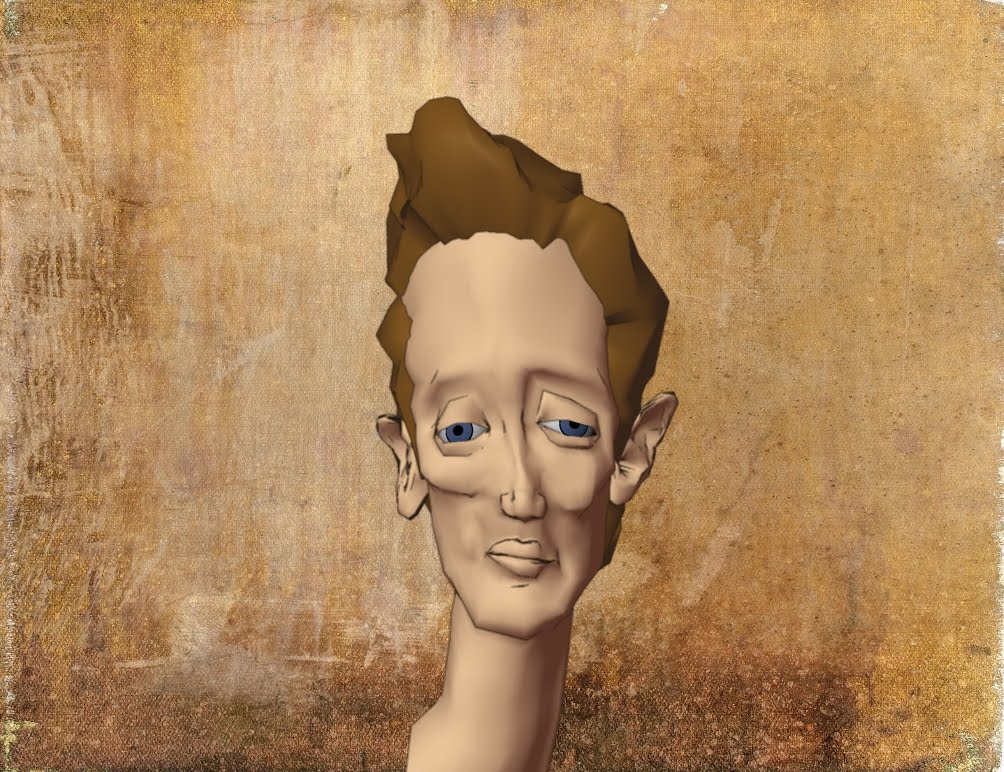
I've been mucking around with the character, now the plan is churn out lots of render layers and see what I can stick together. Hopefully I'll end up with some sort of interesting moving portrait, inspired by the work of Egon Schiele, but utilizing the medium of experimental CG. Fantastic.

new textures applied to ramp shader for painterly effect
another ramp shader applied for shadowy outline

contour rendering for wireframe

playing around with deformers in maya

screenshot of cool glitch whilst editing image using f-spot

more glitches

glitches ain't shit

8 Feb 2012

Schiele goes out with her mate Stella

Now that the Master Class project is complete, I have started making some decent progress on my Innovations. After a couple meetings with my tutor, I have decided to go down a more experimental route. Using the work of Egon Schiele as a starting point, my plan is to imagine how he would utilize today's technology. 

For hundreds of years painting was a medium used to try and accurately depict real life. It wasn't really until the invention of the camera that more expressionist artists appeared, who distorted the real world for emotional effect. I intend to draw parallels between painting and CG, a relatively young medium, which has I feel has not been exploited for all its potential as a platform for expressionism. It seems as if there has become a standard aesthetic that the majority of work tends to adhere to, imitating the Pixar style of clean, perfect animation. Using contemporary artists such as David O'Reillyand Mark Napier as inspiration, I want to play with the idea of things you are and aren't supposed to do, and break the rules. Intersecting meshes, low poly models, tangled vertices, faces deleted here and there. A show reel of beautiful chaos. HOWEVER, first I want to do it 'properly' and show the process of destruction, a kind of before and after, and argue which is more interesting as a piece of art.

 I thought about the features which I feel identifies Sheile's work as his own, in particular his portraiture. The subject is always distorted in some way, stretched and twisted, with limbs body parts bent and buckled, often depicted with harsh edges, and dark outlines. Sometimes entire parts are neglected, either not drawn or left uncoloured. This 'unfinished' look is something I plan to experiment with, maybe leaving patched of wireframe visible underneath the surface of the mesh.


So far, as a starting point, I have modeled a head based on Schiele's portrait of the artist Karl Zakovsek. I've slapped a couple ramp shaders on and used contour rendering for the lines. My next step is to texture it and basically muck around in ZBrush, maybe make some more models, see what happens and kind of play it by ear until it looks how I want it too. Might even animate it if I have time. Fun improvising!